


Filmic Pro: Mobile Cine Camera
2.31.95K Reviews
App Specs
- Version
- 7.6.4
- Updated On
- License
- Free
- Downloads
- 1,000,000+
- Developer
- Bending Spoons
- Categories
- Photography
- Platform
- Android
Screenshots
 Analysis by AppCompare
I approach Filmic Pro as a tool for people who want to make deliberate video choices on a phone, not just tap record and hope for the best. It is a photography app from Bending Spoons, and its emphasis is firmly on video control. That distinction matters: it can make a phone more useful for planned filming, but it will not automatically make every clip look cinematic. The results still depend on light, steady movement, sound, and the time you are willing to spend setting up a shot.
Trust starts with a clear purpose
The app has been available since December 2015, and its current version is 7.6.4. It is free to install, with in-app purchases listed from $0.99 to $59.99 per item. The age rating is Everyone, though the number of controls makes it more appealing to someone who is comfortable exploring camera settings than to a person looking for the simplest possible recording screen. It has more than a million installs, alongside a 2.4 average from about 17,000 ratings and roughly 1,900 written reviews. I would treat that mixed reception as a reason to check whether its hands-on approach suits you, rather than as proof that it will or will not work for your particular phone and workflow.
Trust, for me, also means separating what I can judge from what I should not assume. A camera app is involved at the moment I film, so I would pay attention to the permissions and choices shown by the app and my phone when setting it up. I would not treat a professional-looking interface or a familiar name as a substitute for reading those prompts. If an option is unclear, I prefer to pause and understand it before granting access or relying on a particular workflow.
Control that earns its place
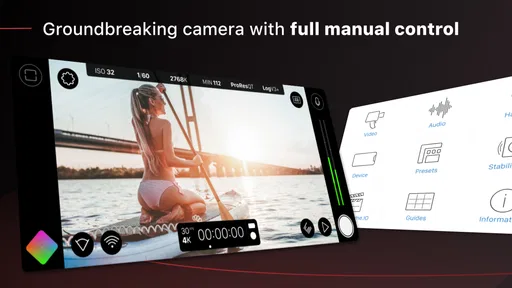
When you first dive into Filmic Pro, it might feel a bit overwhelming. The interface is packed with options and settings, but that's exactly what makes it so powerful. From the get-go, you're given control over things like white balance, focus, and exposure. It's like having a DSLR in your pocket! And the best part? It's all incredibly intuitive once you spend a few minutes exploring.
Make setup part of the shot
One of the standout features is the dual arc slider. It allows you to adjust focus and exposure independently with pinpoint precision. Ever struggled with getting the right lighting? Say goodbye to those worries. The app also supports up to 240 fps slow-motion capture, which is a game-changer for those dramatic shots.
The practical advantage of separating focus from exposure is easy to miss if you only use automatic recording. Imagine filming a friend beside a bright window: you can think about keeping the face clear without asking the camera to make the same decision for the whole image. Or, for a close-up, you can settle focus on the subject before starting a take instead of repeatedly tapping the screen while the moment passes. Those controls are most valuable when the scene stays still long enough for you to use them. For a spontaneous clip, the extra attention may be more hassle than help.
Slow motion is another feature that rewards planning. It is useful for a small, intentional moment—a splash, a quick turn, or a gesture—where slowing the action adds meaning. It is less useful as a default setting for a whole event: the effect can feel distracting if everything is treated as dramatic, and fast-motion footage needs a clear subject to remain readable. I would test the framing and movement before a moment I cannot repeat, rather than discover during playback that the action happened outside the frame.
Worth Reading Before You Choose

Flipboard Shows What News Apps Must Do Beyond the Feed

Switching to Android Auto Means Rethinking Your Driving Routine

Google Calendar Makes a Crowded Week Easier to Manage

Ludo King Makes the Most of the Minutes Between Plans

Baby Panda World Brings Quick Play to Modern Phones, but Its Game Library Feels Busy

ESPN’s Live Game View Makes Following Close Games Easier
Choose a format before recording
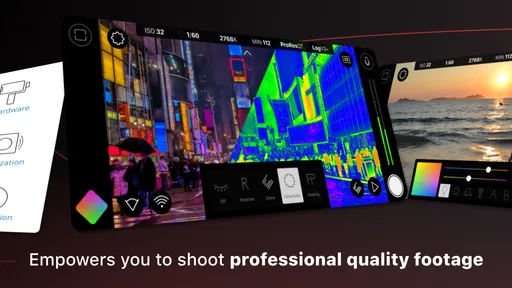
Another cool feature is the ability to shoot in various aspect ratios and resolutions. Whether you’re shooting for Instagram, YouTube, or just your personal collection, Filmic Pro has you covered. Not to mention, the ability to color grade your footage right in the app with its live analytics. This app really makes you feel like a pro.
There is a useful workflow decision hidden in that flexibility: pick the destination before you start. If a clip is meant for a vertical social post, framing it vertically at capture can help you compose for the final screen. If you may want to reuse it in different places, a less tightly cropped composition gives you more room to adapt later. Neither choice is universally right; the trade-off is between a frame designed for one destination and flexibility in editing.
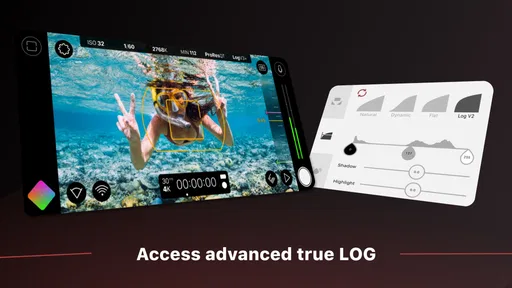
Color tools also invite restraint. Live analysis and in-app grading can help you judge a look while you work, but a strong treatment can make several clips harder to match later. I would first capture a short test under the same light as the main scene, then check whether skin, bright areas, and shadows still look natural. For a quick personal memory, leaving the image alone may be the better choice. For a planned sequence, a consistent look matters more than making each individual shot dramatic.
Permissions, privacy, and practical choices
Video is a data-sensitive kind of content because a recording can include faces, voices, screens, and places, sometimes in the background without anyone noticing. I recommend checking the phone’s permission prompts and settings when you install or use a camera app, and granting only the access that makes sense for the action you want to take. Before filming other people, I also think about consent and about what is visible beyond the intended subject. That is good camera practice, not a claim about this app’s data handling.
For the same reason, I would review where a finished clip is being saved and how I plan to share it. A recording intended for private use does not need to be posted simply because the app makes filming easy. If you use the footage in a public project, check the frame for personal details such as a displayed message, a home address, or a bystander. Those small checks are particularly useful when filming in a hurry, when it is easy to focus on exposure and forget what else the camera has captured.
The visible choices that matter most to my everyday use are the ones I can make before and during a take: what to frame, which image settings to use, whether to apply a look, and whether to keep or share the result. I would also check the purchase screen carefully before choosing any paid option, since the app is free to install but offers in-app purchases. That keeps the decision in my hands: I can judge the basic workflow first and decide whether a paid item has a real role in my projects instead of paying just because a feature sounds professional.
Where it fits among phone cameras
Compared with the standard camera app, this is the more involved choice. A built-in camera is usually better when speed matters: open it, frame the moment, and record with minimal setup. Filmic Pro makes more sense when I want to shape focus and exposure, choose a composition deliberately, or experiment with the image before filming. The difference is not that one is always better; it is that one prioritizes convenience while the other asks for more input in exchange for control.
It also occupies a different place from a simple editing app. Editing tools can improve or trim footage after recording, but they cannot fully rescue a missed focus or a badly exposed moment. A manual capture workflow helps me make those decisions earlier. On the other hand, if I only need to cut a clip, add a caption, and share it, a lightweight camera-and-editor combination may be faster and easier to learn.
For creators who regularly record talking-head videos, short scenes, or footage intended for a particular platform, the controls can be worth learning. For someone who mainly records family moments, calls, or unpredictable events, the regular camera may be the sensible default. And if your priority is a polished finished video with titles and transitions, this app should be considered a capture tool rather than a replacement for a dedicated editor.
Learning without losing the moment
Now, I won't lie to you—there's a bit of a learning curve. But trust me, it's worth it. The app is designed for those who are passionate about videography. Once you get the hang of it, it becomes second nature. The interface is sleek and the responsiveness is top-notch. I found myself getting lost in the creative process, adjusting settings, and experimenting with different modes.
My practical advice is to learn one control at a time, away from a moment you cannot recreate. Start by testing focus and exposure on a stationary subject, then record a short clip and watch it back. Next, try a different frame shape or a slow-motion test. This small routine makes it easier to tell which setting caused a change, and it prevents a promising scene from turning into a session spent searching through controls. Once a setup works for a particular kind of shot, keep your choices simple and concentrate on framing and movement.
A realistic everyday use might be recording a short cooking sequence at home. I would decide whether the finished clip is for a vertical post or a wider video, place the phone securely, and test the light near the counter before starting. I could set focus on the area where the hands will be, check exposure as they move, and capture a separate slow-motion moment only if it adds something. That is where a camera app with manual choices can help: not by doing the creative work for me, but by letting me make a few decisions in advance instead of hoping the automatic camera understands the shot.
For a one-off clip, the same preparation could feel excessive. If a child or pet does something unexpected, opening the regular camera and recording immediately is more important than adjusting a carefully chosen look. I would keep the default camera as my quick option and use Filmic Pro when I have even a little time to plan. Having both approaches available is more useful than expecting a single app to be ideal for every situation.
Also, the community around this app is fantastic. There are tons of tutorials and forums to help you master every aspect of the app. So even if you hit a snag, you're never alone.
Who should make the switch?
I would recommend trying it if you enjoy shaping video while you record and are willing to practise before important shoots. Its controls are particularly relevant to independent creators, students learning visual storytelling, and anyone who often finds the phone’s automatic choices inconsistent with the scene they have in mind. It can also be useful for a small personal project where repeating a shot is possible and a consistent framing or look matters.
I would hesitate if you want a camera that makes every decision for you, dislike adjusting settings, or mostly film fleeting moments. I would also avoid assuming that access to more controls guarantees a better result. An unstable phone, poor light, or a distracting background can still undermine a clip; the app gives you decisions to make, not a shortcut around the basics of shooting.
The store summary describes it as a professional choice, but I judge its usefulness by the kind of work I can actually do with it. For me, the strongest reason to consider it is control at capture. The main cost is attention: you have to learn the interface, think about settings, and decide when manual intervention is worth the time. That balance explains why it can be a rewarding tool for one person and an unnecessary complication for another.
A cautious verdict
So, is Filmic Pro worth the investment? Absolutely. Whether you're a budding filmmaker, a content creator, or just someone who loves to capture the world creatively, this app is a must-have. Its comprehensive feature set and professional-grade capabilities make it stand out in a crowded market.
Yes, it might take a little time to learn, but the results are stunning. I've captured some of my favorite footage using this app, and I can't imagine going back to a standard camera app. So if you're ready to enhance your mobile videography game, give Filmic Pro a try. You won't regret it!
My more measured recommendation is to start with the free install, explore the controls in a low-pressure setting, and see whether you enjoy directing the camera rather than relying on automation. The average rating of 2.4 from around 17,000 ratings makes me cautious about calling it the right fit for everyone, especially if you expect a frictionless point-and-shoot experience. But if manual video capture is what you are looking for, and you are comfortable checking the available purchase choices before spending, it is a distinctive option to test for yourself.
Pros
- High-quality video recording options.
- Manual focus and exposure controls.
- Intuitive user interface design.
- Supports external microphone input.
- Wide range of frame rates available.
Cons
- Steep learning curve for beginners.
- Consumes significant battery life.
- Some features require in-app purchases.
- Limited compatibility with older devices.
- Occasional app crashes reported.
FAQs for Filmic Pro: Mobile Cine Camera
What features does Filmic Pro offer for professional video recording?
Filmic Pro is renowned for its extensive suite of professional-grade features. It includes manual controls for focus, exposure, white balance, and zoom. The app supports multiple frame rates, resolutions, and aspect ratios, making it ideal for filmmakers. Additionally, it offers live analytics tools like histograms and waveforms to ensure precise image quality.
Is Filmic Pro compatible with all smartphones?
While Filmic Pro is available for both Android and iOS, compatibility can vary based on device specifications. High-performance features may require newer models with adequate processing power and camera capabilities. It's recommended to check the app's requirements and your device’s specifications before purchasing to ensure full functionality.
How does Filmic Pro enhance audio recording?
Filmic Pro provides advanced audio recording options to complement its video capabilities. Users can connect external microphones for improved sound quality and adjust audio levels manually. The app also supports stereo recording and offers audio monitoring features, ensuring that the captured sound matches the high quality of the visuals.
Does Filmic Pro support external hardware integration?
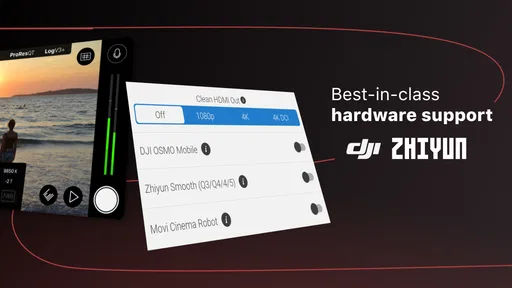
Yes, Filmic Pro supports integration with various external hardware. It works with gimbals, lenses, and microphones, enhancing the filming experience. The app also offers compatibility with Filmic Remote, allowing for remote control of the app’s functions, which is particularly useful for complex shooting setups.
What are the costs associated with using Filmic Pro?
Filmic Pro is a paid app, and additional features may require in-app purchases. While the core app provides robust functionality, users can expand its capabilities with optional add-ons like the Cinematographer Kit. These purchases are generally one-time fees, offering a cost-effective solution for mobile videographers seeking professional results.


